Which Permitting Software Should I Get?
Every vendor calls themselves 'permitting software.' The term covers three genuinely different product categories. Here's how to tell them apart and pick the right one.
By Will Maclean
Every vendor in this space calls themselves "permitting software." A quick search brings up e-permitting platforms, plan review tools, and AI compliance checkers. They all use the same keywords and promise to modernize your department. The problem is that these are three distinct product categories solving completely different problems. Before comparing features, a building official needs to identify which specific bottleneck is slowing down their process.
Three Categories, One Label
All three categories touch the permit process, but they handle different stages and have distinct impacts on turnaround times.
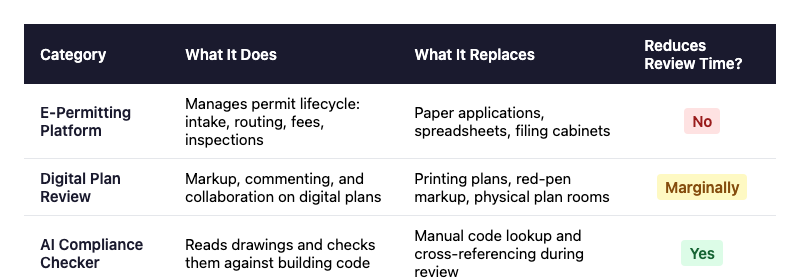
E-permitting platforms handle the permit lifecycle. This includes intake, routing, fee calculation, and scheduling. Players like Accela, Tyler EnerGov, OpenGov, and Cloudpermit fall into this group. They are excellent for replacing paper applications and spreadsheets, which digitizes the administrative workflow. However, they do not change the time it takes to review the actual plans.
Digital plan review tools include ProjectDox, DigEplan, and Bluebeam Revu. These platforms allow teams to mark up digital PDFs and collaborate online, replacing physical printed plans. They improve coordination, but the reviewer still does the cognitive work of reading drawings, looking up code sections, and cross-referencing requirements manually.
AI compliance checkers, such as Archistar, CodeComply.ai, and set4, actually read the architectural drawings and cross-reference them against building codes. They are the only category built specifically to reduce the hours an examiner spends analyzing a single submission.
What to Actually Evaluate
Once the right category is identified, the evaluation criteria become much clearer.
Jurisdiction support: Ensure the tool handles your specific local code amendments. A system optimized for California energy standards will not help a department in Texas without significant configuration. Ask vendors exactly how they handle your state and local rules, rather than accepting a generic claim of IBC support.
Integration: If an e-permitting system is already in place, any new plan review or AI tool must connect to it. Otherwise, it simply creates another silo. Ask about APIs, existing integrations, and how the data actually flows between systems.
Pricing models: Costs vary significantly by category. E-permitting platforms usually involve large enterprise contracts. Plan review tools often charge per user license, while AI checkers typically charge per submission. The right choice depends on volume. A high-volume city might prefer paying per seat, while a smaller county could benefit from a per-use model.
Deployment timeline: Legacy systems can take 12 to 18 months to launch. Newer cloud and AI tools can often be deployed in a matter of weeks. If a department is currently dealing with a severe backlog, deployment speed may be a deciding factor.
The Landscape
Here is a direct look at the major platforms, outlining their strengths and limitations.
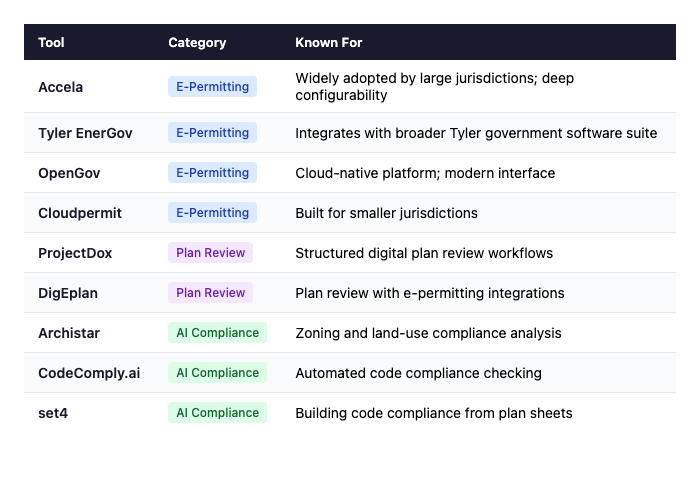
Accela is the established incumbent in e-permitting. It offers deep configurability, complex multi-department workflows, and GIS integration. On the downside, it is expensive and takes a long time to implement, with 12 to 18 months being standard. It is a good fit for complex workflows, but the total cost of ownership requires careful review.
Tyler EnerGov is Accela's primary competitor. It makes sense if a jurisdiction already uses the Tyler ecosystem for finance or courts, as it integrates cleanly. Otherwise, choosing between the two usually comes down to vendor preference.
OpenGov is a cloud-native alternative. It offers a modern user experience and faster setup times, making it a strong fit for mid-sized departments that do not require the extensive customization of Accela.
Cloudpermit is designed for smaller jurisdictions. It is quick to deploy, easier to manage, and priced for smaller budgets. It is a practical option for towns that do not need enterprise-level features.
ProjectDox and DigEplan dominate the digital plan review space. They are effective for keeping teams organized and eliminating paper plan rooms. However, they are coordination tools rather than intelligence tools. The team is still required to conduct the code research manually.
Archistar is an established AI checker with strong capabilities in zoning and land-use analysis. It excels at spatial analysis and setbacks, though its building code coverage is not yet as comprehensive as its zoning features.
set4 is our company. Full disclosure, you are reading our blog. We are in the AI compliance checking category, specifically focused on scanning plan sheets against building codes. You can explore the rest of the site to see our capabilities.
Full Comparison
How to Approach Purchasing
Most building departments need a combination of tools from two of these categories rather than a single platform that claims to do everything.
If the process is currently paper-based, start with an e-permitting platform. Digitize the foundation by getting applications, routing, and fees online first.
If the department is already digital but facing review backlogs, an AI compliance checker is needed to accelerate the actual analysis.
If the primary issue is reviewers duplicating work or losing track of comments, a digital plan review tool will resolve the coordination problems.
The key takeaway is that e-permitting and AI compliance checking are not competing purchases. One handles the workflow, and the other handles the analysis. Viewing them as an either/or decision often leads to solving the wrong problem.